
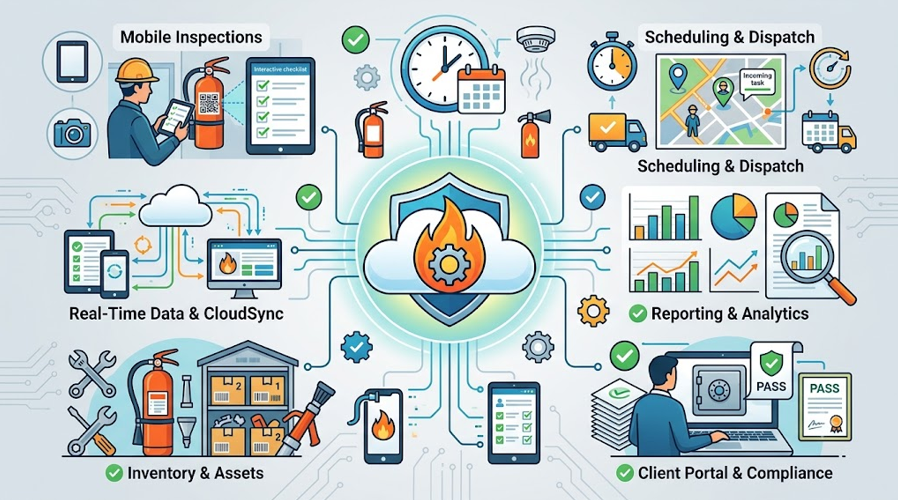
Choosing fire inspection software for your business is a big decision — the right platform keeps your company compliant, your technicians efficient, and your clients confident that their fire and life safety systems are properly maintained. The wrong choice, on the other hand, can mean paying for features you never use while still missing the tools you actually need to run inspections, track maintenance, and prove compliance.
With dozens of fire safety software options on the market, all claiming to be the best fire safety management software for your business, it helps to know exactly which features matter and why. This guide walks through the essential capabilities to evaluate when choosing fire maintenance software, fire prevention software, or a broader fire protection service management software platform — covering compliance, field operations, business management, and long-term scalability.
1. Code-Compliant, Standardized Inspection Checklists
At the core of any good fire compliance software is a set of digital checklists built around recognized standards — most importantly NFPA 25 software functionality for sprinkler system inspections, along with checklists aligned to NFPA 10, NFPA 72, and relevant local AHJ requirements.
Look for platforms that:
- Offer pre-built, code-referenced checklist templates rather than requiring you to build compliance logic from scratch
- Allow customization for local jurisdiction requirements
- Guide technicians step-by-step through required test points, so nothing gets skipped
This is the foundation that separates true fire safety compliance software from a generic task-tracking app.
2. Mobile Access for Field Technicians
Inspections and maintenance happen in the field, not behind a desk — which is why mobile fire inspection software is non-negotiable. A strong mobile experience should let technicians:
- Complete inspection checklists directly on a phone or tablet
- Capture photos of deficiencies on the spot
- Work offline at sites with poor signal, syncing automatically once reconnected
- Get client sign-off digitally, without paper forms
The best fire inspection apps are built specifically for field conditions — quick to use with gloves on, readable in bright sunlight, and reliable even in basements or mechanical rooms with no cell coverage.
3. Asset and Equipment Tracking
Every extinguisher, sprinkler head, alarm panel, and suppression system on a property needs its own inspection history. Look for fire extinguisher maintenance software and broader system-tracking tools that support:
- Barcode or QR code scanning for instant access to an asset’s history
- Individual due-date tracking for every device, not just each site
- A complete audit trail showing who inspected what, and when
This level of detail is what turns a fire compliance inspection app into a genuinely reliable compliance system rather than a simple digital clipboard.
4. Automated Scheduling for Recurring Compliance Work
Fire and life safety inspections aren’t one-time events — they’re recurring obligations with strict intervals. Strong fire safety management software should automatically:
- Generate future work orders based on required inspection frequencies
- Alert office staff and technicians ahead of upcoming due dates
- Prevent overdue inspections from slipping through unnoticed
This turns compliance from something your team has to remember into something the system manages for you.
5. Deficiency Tracking and Corrective Action Workflows
Finding a problem is only half the job — proving it was fixed is what protects your business and your client. Look for fire code inspection software that can:
- Flag failed test points automatically during an inspection
- Generate a follow-up work order tied to the original deficiency
- Track the deficiency through to verified resolution
- Maintain a permanent record of the entire corrective action process
This closed-loop tracking is exactly what auditors, insurers, and AHJs expect to see — and it’s a feature that separates serious fire safety compliance software from basic inspection apps.
6. Centralized, Searchable Compliance Records
When compliance data lives in one centralized system rather than scattered paper files, you can pull up any client’s, site’s, or asset’s full inspection history in seconds. This matters for:
- Responding quickly to AHJ or insurance audit requests
- Giving property managers instant proof of compliance
- Spotting patterns, like a site with recurring deficiencies
A true fire and life safety software platform should make historical records as accessible as current ones.
7. Scheduling and Dispatch Tools
Beyond compliance-driven scheduling, good fire protection field service software should help you run day-to-day operations efficiently:
- Real-time visibility into technician location and availability
- Route optimization to reduce drive time between jobs
- Easy rescheduling and dispatch adjustments when priorities shift
This is especially important for fire safety field service software used by companies covering large or spread-out service territories.
8. Integrated Accounting and Invoicing
Disconnected billing processes are one of the most common sources of lost revenue in fire protection businesses. Strong fire protection business software should connect completed jobs directly to invoicing, so:
- Invoices generate automatically when a job is marked complete
- Recurring service contracts are billed accurately and on schedule
- Deficiency-driven repair work is captured and billed without manual cross-referencing
This eliminates the gap between finishing a job and getting paid for it.
9. Client Portals and Communication Tools
Property managers and business owners increasingly expect self-service access to their own compliance data. Look for platforms offering:
- Client portals where customers can view inspection history and certificates
- Automated notifications for upcoming appointments and completed work
- Easy access to compliance documentation without needing to call your office
This is particularly valuable for fire safety for property managers, who are often responsible for compliance across multiple buildings and want quick, transparent access to records.
10. Reporting and Business Analytics
A good fire management software platform shouldn’t just store data — it should help you use it. Look for dashboards and reports that reveal:
- Technician productivity and job completion rates
- Overdue or at-risk inspections across your client base
- Revenue trends and job profitability
- Deficiency patterns across sites or equipment types
These insights help owners make informed decisions about staffing, pricing, and where to focus growth.
11. Scalability and ERP-Level Integration
As your business grows, a tool that worked fine with five technicians can quickly become a bottleneck with fifty. Evaluate whether the software can scale by supporting:
- Multiple service lines (extinguishers, sprinklers, alarms, suppression systems, backflow, and more) within one platform
- Additional users, technicians, and client accounts without a system overhaul
- Integration with accounting, CRM, or other business systems you already rely on
The strongest fire safety business software options function less like a single-purpose app and more like an operating system for the entire business — connecting inspections, scheduling, compliance, and finance in one place.
12. Support for Specialized or Niche Requirements
Depending on your business, you may also need more specialized functionality, such as:
- Fire agency inspection software capabilities for departments handling apparatus and station-level checks in addition to commercial inspections
- Fire alarm service software modules for companies specializing in alarm monitoring and testing
- Functional safety management software features for businesses managing broader industrial safety compliance alongside fire protection
- Tools resembling platforms like Capstone fire and safety management, for companies that need robust asset and facilities-level safety tracking
Not every business needs every one of these, but it’s worth mapping your specific service mix against a platform’s capabilities before committing.
Putting It All Together: Evaluating Your Options
When comparing fire inspection software programs, it helps to score each option against your actual day-to-day needs rather than a generic feature list. Ask:
- Does it cover every inspection type our business performs (extinguishers, sprinklers, alarms, suppression, and beyond)?
- Can technicians use it easily in real field conditions, including offline?
- Does it automate scheduling for recurring compliance work, or just track it manually?
- Is deficiency tracking built in, with a clear path from problem to resolution?
- Does it connect directly to invoicing and accounting, or require manual cross-referencing?
- Will it still fit our business if we double in size next year?
A platform that checks most or all of these boxes isn’t just fire inspection software — it’s a full fire safety service management software solution capable of supporting compliance, field operations, and business growth from a single system.
Final Thoughts
The best fire prevention software and fire maintenance software platforms do more than digitize a paper checklist — they connect compliance, field execution, scheduling, and billing into one coherent system built specifically around the realities of fire and life safety work. When evaluating your options, prioritize depth over flash: code-aligned checklists, reliable mobile tools, real deficiency tracking, and integration with the rest of your business will matter far more in daily use than a long list of features you’ll never touch.
Choosing the right software isn’t just about staying organized — it’s about protecting your business, your technicians, and ultimately the people who depend on the fire and life safety systems you maintain.